Python complex(): Constructing & Operating on Complex Numbers
The complex(real=0, imag=0) built-in function constructs a complex number with specified real and imaginary components, or parses one from a string literal.
Complex Plane & cmath Arithmetic: In Python, the imaginary unit is represented by j or J. Complex numbers contain floating-point .real and .imag attributes, and define .conjugate() to invert the imaginary sign. To compute magnitude on the complex plane, use abs(). For real number conversions, see float() and int().
1. Syntax & Formal Parameter Specifications 🔝
The complex() constructor supports numeric pair inputs or single string literals:
# Formal syntax of built-in complex()
# Form 1: Numeric components (real and imaginary parts)
z = complex(real=0, imag=0)

# Form 2: Parsing from string representation (NO WHITESPACE around operators!)
z_from_str = complex(string_literal)| Parameter | Type Accepted | Behavioral Details |
|---|---|---|
real |
int, float, str |
Real part of the complex number. Defaults to 0. If passed as a string, no second argument is allowed. |
imag |
int, float |
Imaginary part multiplied by 1j. Defaults to 0. |
| Return Value | complex object |
An immutable complex number object in rectangular form (real+imag*j). |
2. Basic Usage: Real and Imaginary Attributes 🔝
Complex numbers expose read-only .real and .imag properties as 64-bit floats:
# 1. Constructing complex numbers
z1 = complex(4, 3)
print("z1 value: ", z1) # (4+3j)
print("z1 type: ", type(z1)) # Output:
z1 value:         (4+3j)
z1 type:
Real component:   4.0
Imag component:   3.0
Type of real:
Conjugate:        (4-3j)
3. String Parsing Constraints & Formatting 🔝
When parsing from strings, Python strictly forbids whitespace around the central + or - operator:
# Parsing complex numbers from strings
# Valid: No whitespace around the '+' or '-' sign
z_str = complex("4+3j")
print("From string '4+3j': ", z_str)

# Supplying negative components
z_neg = complex("-2.5-1.2j")
print("From string '-2.5-1.2j':", z_neg)
Output:
From string '4+3j':  (4+3j)
From string '-2.5-1.2j': (-2.5-1.2j)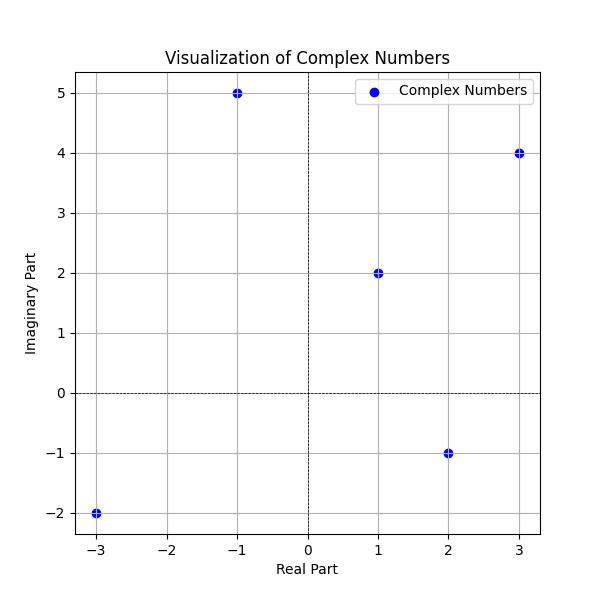
4. Polar Coordinates & cmath Module Integration 🔝
Python includes the standard cmath module for advanced complex mathematical functions and polar conversions:
import cmath
import math

# Complex arithmetic and polar coordinates
z = 3 + 4j

# Magnitude (modulus) and phase angle (radians)
modulus = abs(z)
phase = cmath.phase(z)

print("Modulus abs(3+4j):  ", modulus)                      # 5.0
print("Phase in radians:   ", phase)                        # 0.9272952180016122
print("Phase in degrees:   ", math.degrees(phase))          # 53.13010235415598

# Polar to rectangular coordinate conversion
r, theta = cmath.polar(z)
print("Polar coordinates:  ", (r, theta))
print("Rectangular back:   ", cmath.rect(r, theta))
Output:
Modulus abs(3+4j):   5.0
Phase in radians:    0.9272952180016122
Phase in degrees:    53.13010235415598
Polar coordinates:   (5.0, 0.9272952180016122)
Rectangular back:    (3+4j)
5. 2D Rotations via Complex Multiplication 🔝
Multiplying a complex vector by cmath.exp(1j * angle) rotates the point counterclockwise without trigonometry matrices:
import cmath
import math

# Rotating a 2D point/vector by an angle using complex multiplication
z = 3 + 4j
angle = math.radians(45)  # Rotate 45 degrees counterclockwise

# Rotation by angle theta: z * e^(i*theta)
rotated_z = z * cmath.exp(1j * angle)

print("Original vector: ", z)
print("Rotated 45 deg:  ", rotated_z)
Output:
Original vector:  (3+4j)
Rotated 45 deg:   (-0.7071067811865475+4.949747468305834j)
6. Production Recipes & Practical Applications 🔝
Below are real-world recipes utilizing complex numbers for AC electrical impedance and threshold filtering:
# Recipe A: AC electrical impedance calculations
# Impedance Z = R + jX (Resistance R + Reactance X)
R1 = 50.0   # 50 ohms resistance
X1 = 30.0   # 30 ohms inductive reactance
Z1 = complex(R1, X1)

R2 = 40.0
X2 = -20.0  # 20 ohms capacitive reactance
Z2 = complex(R2, X2)

# Series impedance: Z_total = Z1 + Z2
Z_series = Z1 + Z2
print("Series Impedance:   ", Z_series)
print("Total magnitude (R):", abs(Z_series))

# Recipe B: Complex threshold filtering
points = [3 + 4j, 1 + 2j, -1 + 5j, -3 - 2j, 2 - 1j]
threshold = 5.0

within_radius = [pt for pt in points if abs(pt) <= threshold]
print("Points within radius 5.0:", within_radius)
Output:
Series Impedance:    (90+10j)
Total magnitude (R): 90.55385138137417
Points within radius 5.0: [(3+4j), (1+2j), (-3-2j), (2-1j)]
7. Common Pitfalls & Developer Traps 🔝
Frequent Traps with complex()
- Whitespace in String Input: Writing
complex("4 + 3j")with spaces raisesValueError: complex() arg is a malformed string. Ensure no spaces surround the operator:"4+3j". - No Ordering Comparisons: Complex numbers have no natural ordering on the complex plane. Statements like
(1+2j) < (3+4j)raiseTypeError. Compare their magnitudes usingabs(z1) < abs(z2)instead. - Second Argument with String: Calling
complex("4+3j", 2)raisesTypeError: complex() can't take second arg if first is a string.
# Pitfall 1: Whitespace in string literals causes ValueError
try:
    complex("4 + 3j")  # Notice space around '+'!
except ValueError as err:
    print("Whitespace ValueError:", err)

# Pitfall 2: Second argument with string input raises TypeError
try:
    complex("4+3j", 4)
except TypeError as err:
    print("TypeError caught:     ", err)

# Pitfall 3: Complex numbers do NOT support ordering operators (<, <=, >, >=)
try:
    print((1 + 2j) < (3 + 4j))
except TypeError as err:
    print("Ordering TypeError:   ", err)
Output:
Whitespace ValueError: complex() arg is a malformed string
TypeError caught:      complex() can't take second arg if first is a string
Ordering TypeError:    '<' not supported between instances of 'complex' and 'complex'
8. Interactive Notebook & Practice Exercises 🔝
Practice complex arithmetic, 2D vector rotations, and AC impedance modeling in our companion Jupyter Notebook:
Interactive Companion Jupyter Notebook
Explore interactive code cells, plot complex numbers in 2D planes with matplotlib, rotate vectors, and run self-validating assertions.
View on GitHub Run in Google ColabSelf-Verifying Assertion Suite
Run these unit checks directly in Python or your local environment to verify complex() mechanics:
def test_complex_mechanics():
    # 1. Constructors
    assert complex() == 0j
    assert complex(4, 3) == 4 + 3j
    assert complex("4+3j") == 4 + 3j

    # 2. Real and imaginary components
    z = complex(2.5, -1.5)
    assert z.real == 2.5
    assert z.imag == -1.5
    assert z.conjugate() == complex(2.5, 1.5)

    # 3. Absolute modulus
    assert abs(complex(3, 4)) == 5.0

    print("All complex() unit assertions passed! 100% verified.")

test_complex_mechanics()
Output:
All complex() unit assertions passed! 100% verified.9. Related Built-in Functions & Math Tools 🔝
abs()
Computes the Euclidean magnitude of a complex number.
float()
Converts numbers or strings into real floating-point numbers.
int()
Converts numbers or strings into integers with arbitrary precision.
math Module
Comprehensive mathematical functions for real numbers.

Subhendu Mohapatra
Author & Instructor at plus2net
I write and maintain practical tutorials on Python, PHP, SQL, JavaScript, HTML, jQuery, and web development at plus2net. The tutorials focus on clear explanations, working examples, and code that readers can test and adapt while learning.


Subscribe to our YouTube Channel here

 Python Video Tutorials