HTML <output> Tag for Displaying Calculated Results
The HTML <output> element represents the result of a calculation or user action. It is useful for calculators, totals, live measurements and other values generated from form controls or scripts.
The element is form-associated, but its value is not submitted with the form. Use it to display a result, not as a hidden way to send calculated data to the server.
Basic <output> example Top ↑
This example adds two number inputs and displays the result immediately.
<form id="sumForm">
  <label for="a">First number</label>
  <input type="number" id="a" name="a" value="10">

  <label for="b">Second number</label>
  <input type="number" id="b" name="b" value="20">

  <label for="result">Total</label>
  <output id="result" name="result" for="a b">30</output>
</form>
Rendered example:
Updating <output> with JavaScript Top ↑
For reusable pages, it is usually clearer to attach an event listener in JavaScript instead of placing calculation logic inside an inline oninput attribute.
const form = document.getElementById("sumForm");
const a = form.elements["a"];
const b = form.elements["b"];
const result = form.elements["result"];

form.addEventListener("input", () => {
  result.value = a.valueAsNumber + b.valueAsNumber;
});
See the JavaScript events tutorial for more event-handling examples.
Attributes of the <output> element Top ↑
for: a space-separated list of element IDs that contributed to the result. It describes the relationship; it does not perform the calculation.form: associates the output with a form by that form'sid, even when the output is outside the form.name: gives the output a name so it can be accessed through APIs such asform.elements. The name and value are still not submitted.
Associating an output outside the form Top ↑
<form id="priceForm">
  <input type="number" id="qty" name="qty">
</form>

<output form="priceForm" for="qty" name="total">0</output>
Does <output> submit its value? Top ↑
No. An <output> can belong to a form and can appear in form.elements, but its displayed result is not included in submitted form data. If the server needs a calculated value, submit the original inputs and calculate or validate the result again on the server.
This avoids trusting a client-side value that a user could change before submission. For related form basics, see HTML forms and server-side form data checking with PHP.
Styling the output with CSS Top ↑
output {
  font-weight: 700;
  padding: 0.25rem 0.5rem;
  border: 1px solid #ccc;
}
Complete example with CSS and <output> Top ↑
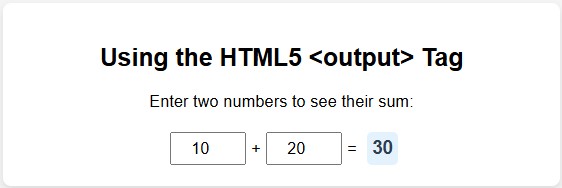
<!DOCTYPE html>
<html lang="en">
<head>
  <meta charset="UTF-8">
  <meta name="viewport" content="width=device-width, initial-scale=1.0">
  <title>HTML output example</title>
  <style>
    output { font-weight: 700; padding: 0.25rem 0.5rem; }
  </style>
</head>
<body>
  <form id="calculator">
    <label for="num1">First number</label>
    <input type="number" id="num1" name="num1" value="10">

    <label for="num2">Second number</label>
    <input type="number" id="num2" name="num2" value="20">

    <label for="total">Total</label>
    <output id="total" name="total" for="num1 num2">30</output>
  </form>

  <script>
    const form = document.getElementById("calculator");
    const total = form.elements["total"];
    form.addEventListener("input", () => {
      total.value = form.elements["num1"].valueAsNumber +
                    form.elements["num2"].valueAsNumber;
    });
  </script>
</body>
</html>
Accessibility considerations Top ↑
The <output> element has semantics for presenting a result, but good accessibility still depends on clear labels and understandable context. When the result changes frequently, avoid updates so rapid that they become distracting. The element's implicit accessibility role is suitable for status-like result updates, so additional ARIA is usually unnecessary unless a specific interaction requires it.
Common mistakes Top ↑
- Expecting
for="a b"to calculate the result automatically. - Assuming the output value is submitted with the form.
- Using
parseInt()where decimal input is allowed and losing the fractional part. - Leaving number fields without labels.
- Trusting a browser-calculated result instead of validating or recalculating important values on the server.
Frequently asked questions Top ↑
What is the HTML <output> tag used for?
It represents a result produced by a calculation or user action, such as a total, score or converted value.
Does <output> calculate values by itself?
No. HTML provides the result container; JavaScript or another process performs the calculation.
What does the for attribute do on <output>?
It lists the IDs of elements that contributed to the result and describes their relationship to the output.
Is the output value submitted with a form?
No. The output is form-associated, but its value and name are not included in submitted form data.
Can <output> be outside a form?
Yes. Use the form attribute with the target form's id to associate it explicitly.
Should I use <output> instead of a normal div?
Use <output> when the content is specifically the result of a calculation or user action. A generic <div> is better for unrelated dynamic content.

Subhendu Mohapatra
Author & Instructor at plus2net
I write and maintain practical tutorials on Python, PHP, SQL, JavaScript, HTML, jQuery, and web development at plus2net. The tutorials focus on clear explanations, working examples, and code that readers can test and adapt while learning.


