Delete a Selected MySQL Record from Tkinter Treeview
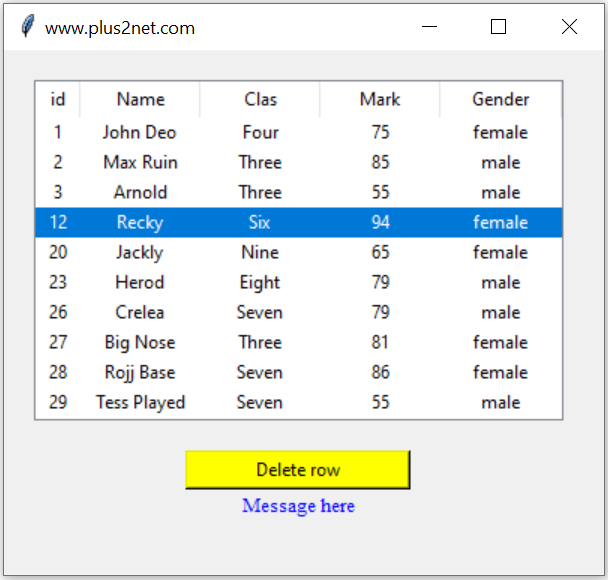
This tutorial extends displaying MySQL records in Tkinter Treeview. The user selects a Treeview row, confirms the delete operation, and Python deletes the corresponding record from the MySQL student table.
The Treeview row is removed only after MySQL confirms that exactly one database record was deleted.
Treeview selection
        |
        v
Read database ID from iid
        |
        v
Ask user for confirmation
        |
        v
DELETE FROM student WHERE id=...
        |
        v
Database confirms deletion
        |
        v
Remove Treeview itemShow Table of Contents
Use MySQL ID as the Treeview iid 🔝
When loading the MySQL rows, use the unique database primary key as the Treeview item ID:
tree.insert(
    '',
    tk.END,
    iid=str(row['id']),
    values=(row['id'],row['name'],row['class'],row['mark'],row['gender'])
)
This gives us a direct relationship:
MySQL student.id = 14
Treeview iid     = '14'
When the Treeview item is selected, its iid immediately tells us which MySQL record should be deleted.
Read the Selected Treeview Row 🔝
A common unsafe pattern is:
selected_item=tree.selection()[0]If no row is selected, this raises an IndexError.
Check the selection first:
selected=tree.selection()

if not selected:
    messagebox.showwarning('Delete Record','Select a record to delete.')
    return

selected_item=selected[0]
Get the Selected Row Values
values=tree.item(selected_item,'values')
student_name=values[1]
We can use the name in the confirmation dialog so the user knows exactly which record is about to be removed.
Ask the User before Deleting 🔝

confirmed=messagebox.askyesno(
    'Confirm Delete',
    f'Delete ID {selected_item} - {student_name}?'
)

if not confirmed:
    return
If the user chooses No, no database operation is performed.
Delete the Selected Record from MySQL 🔝
Use a parameterized DELETE query:
query=text('DELETE FROM student WHERE id=:delete_id')Convert the Treeview item ID to an integer:
delete_id=int(selected_item)Then execute:
with engine.begin() as conn:
    result=conn.execute(query,{'delete_id':delete_id})
    deleted_rows=result.rowcount
The database ID is passed separately from the SQL statement rather than being concatenated into the query string.
Why Use engine.begin()? 🔝
The database operation is placed inside:
with engine.begin() as conn:If the block finishes successfully, SQLAlchemy commits the transaction. If the database raises an exception, the transaction is rolled back.
This replaces the older pattern of keeping one connection open and calling:
my_conn.commit()manually after each operation.
Remove the Row from Treeview after Database Success 🔝
After the transaction has completed, check the affected-row count:
if deleted_rows==1:
    tree.delete(selected_item)
    show_status('Record deleted.','green')
else:
    show_status('Record was not found in the database.','red')
If MySQL reports zero deleted rows, the Treeview item remains visible. This signals that the GUI and database should be checked or reloaded.
tree.delete() first. If MySQL later rejects the DELETE, removing the GUI row first would make the Treeview inconsistent with persistent data.Load MySQL Records into Treeview 🔝
A reusable loading function helps keep the Treeview synchronized.
def load_records():
    for item in tree.get_children():
        tree.delete(item)

    query=text('SELECT id,name,class,mark,gender FROM student ORDER BY id LIMIT 10')

    with engine.connect() as conn:
        rows=conn.execute(query).mappings().all()

    for row in rows:
        tree.insert('',tk.END,iid=str(row['id']),values=(row['id'],row['name'],row['class'],row['mark'],row['gender']))
Clearing existing rows first prevents duplicate Treeview iid values when the data is refreshed.
Complete Tkinter Treeview MySQL Delete Program 🔝
import tkinter as tk
from tkinter import ttk, messagebox
from sqlalchemy import create_engine, text
from sqlalchemy.exc import SQLAlchemyError

engine=create_engine('mysql+mysqldb://id:pw@localhost/my_db')

root=tk.Tk()
root.geometry('560x380')
root.title('Delete MySQL Record - plus2net')

status_var=tk.StringVar()

def show_status(message,color):
    status_var.set(message)
    status_label.config(fg=color)
    root.after(3000,lambda:status_var.set(''))

def load_records():
    for item in tree.get_children():
        tree.delete(item)

    query=text('SELECT id,name,class,mark,gender FROM student ORDER BY id LIMIT 10')

    try:
        with engine.connect() as conn:
            rows=conn.execute(query).mappings().all()
    except SQLAlchemyError as e:
        print(e)
        show_status('Unable to load database records.','red')
        return

    for row in rows:
        tree.insert('',tk.END,iid=str(row['id']),values=(row['id'],row['name'],row['class'],row['mark'],row['gender']))

def selection_changed(event=None):
    delete_btn.config(state=tk.NORMAL if tree.selection() else tk.DISABLED)

def confirm_delete():
    selected=tree.selection()

    if not selected:
        messagebox.showwarning('Delete Record','Select a record to delete.')
        return

    selected_item=selected[0]
    values=tree.item(selected_item,'values')
    student_name=values[1] if len(values)>1 else ''

    confirmed=messagebox.askyesno('Confirm Delete',f'Delete ID {selected_item} - {student_name}?')

    if confirmed:
        delete_record(selected_item)

def delete_record(selected_item):
    try:
        delete_id=int(selected_item)
    except ValueError:
        show_status('Invalid database ID.','red')
        return

    query=text('DELETE FROM student WHERE id=:delete_id')

    try:
        with engine.begin() as conn:
            result=conn.execute(query,{'delete_id':delete_id})
            deleted_rows=result.rowcount
    except SQLAlchemyError as e:
        print(e)
        show_status('Database delete failed.','red')
        return

    if deleted_rows==1:
        tree.delete(selected_item)
        delete_btn.config(state=tk.DISABLED)
        show_status(f'Record {delete_id} deleted.','green')
    else:
        show_status('Record was not found in MySQL. Reload the data.','red')

tree=ttk.Treeview(root,columns=('id','name','class','mark','gender'),show='headings',selectmode='browse',height=10)
tree.grid(row=0,column=0,columnspan=3,padx=20,pady=20)

tree.column('id',width=50,anchor='center')
tree.column('name',width=120,anchor='w')
tree.column('class',width=90,anchor='center')
tree.column('mark',width=70,anchor='center')
tree.column('gender',width=90,anchor='center')

tree.heading('id',text='ID')
tree.heading('name',text='Name')
tree.heading('class',text='Class')
tree.heading('mark',text='Mark')
tree.heading('gender',text='Gender')

delete_btn=tk.Button(root,text='Delete Selected Record',state=tk.DISABLED,command=confirm_delete)
delete_btn.grid(row=1,column=0,pady=5)

reload_btn=tk.Button(root,text='Reload Records',command=load_records)
reload_btn.grid(row=1,column=1,pady=5)

status_label=tk.Label(root,textvariable=status_var)
status_label.grid(row=2,column=0,columnspan=3,pady=8)

tree.bind('<<TreeviewSelect>>',selection_changed)

load_records()
root.mainloop()
What Does rowcount Tell Us? 🔝
The DELETE targets a primary key:
DELETE FROM student WHERE id=:delete_idSo the expected outcomes are:
rowcount | Meaning | GUI Action |
|---|---|---|
| 1 | One matching database row was deleted. | Remove the Treeview item. |
| 0 | The ID was not found. | Keep the Treeview item and suggest reload. |
A primary-key DELETE should not normally affect more than one row.
Common Treeview/MySQL Delete Errors 🔝
1. Accessing selection()[0] without Checking
Always test whether a row has been selected.
2. Deleting from Treeview before MySQL
Delete from the persistent database first. Remove the GUI row only after database success.
3. Forgetting User Confirmation
Deletion is destructive. A confirmation dialog reduces accidental removal.
4. Keeping a Connection Open for the Entire Application
Create the SQLAlchemy Engine once and use short-lived connections or transaction contexts when required.
5. Forgetting to Commit the DELETE
engine.begin() handles commit automatically when the block succeeds.
6. Building the DELETE Query with String Concatenation
Use:
WHERE id=:delete_idand pass the value separately.
7. Showing Raw Database Details to the End User
For a tutorial or application, log or print the technical exception and show the user a simpler database-error message.
8. Foreign Key Constraint Prevents Deletion
If another table references the selected student record, MySQL can reject the DELETE depending on the foreign-key rules. The exception should be handled and the Treeview row must remain visible.
9. Record Was Already Deleted Elsewhere
If rowcount is zero, the Treeview may be stale. Reload the records instead of removing the item blindly.
Frequently Asked Questions 🔝
Read the selected Treeview iid, use it as the MySQL primary key in a parameterized DELETE query, and remove the Treeview item only after the database confirms the deletion.
The unique database primary key creates a direct link between the Treeview item and its MySQL record, making delete and update operations easier.
A DELETE operation is destructive. Confirmation lets the user cancel an accidental selection before the database is changed.
The matching database record was not deleted. The Treeview item should remain visible and the records can be reloaded to synchronize the GUI.
It provides a transaction that commits when the block succeeds and rolls back if a database exception occurs.
MySQL can reject the DELETE. Handle the database exception and leave the Treeview row unchanged.
Treeview MySQL Delete Summary 🔝
- Use the MySQL primary key as Treeview
iid. - Check
selection()before reading the selected item. - Ask the user to confirm destructive operations.
- Use the selected
iidas the database record ID. - Use a parameterized DELETE query.
- Use
engine.begin()for transactional DELETE operations. - Remove the Treeview row only after the database operation succeeds.
rowcount == 1confirms the expected deletion.- If
rowcount == 0, keep the GUI row and reload data if necessary. - Foreign-key constraints can prevent deletion.
- Do not show raw database errors unnecessarily in the GUI.
- A reusable
load_records()function helps resynchronize Treeview with MySQL.
MySQL DELETE Tutorial Delete Selected DataFrame Row Select, Edit and Update MySQL Records

Subhendu Mohapatra
Author & Instructor at plus2net
I write and maintain practical tutorials on Python, PHP, SQL, JavaScript, HTML, jQuery, and web development at plus2net. The tutorials focus on clear explanations, working examples, and code that readers can test and adapt while learning.


Subscribe to our YouTube Channel here

 Python Video Tutorials